Skywork Review: Is This AI Workspace Good for Presentations?
AI tools are changing how people create work content. Many users no longer want AI to only write text. They want AI to help create full outputs, such as reports, presentations, spreadsheets, images, webpages, and even podcasts.
Skywork is one of the tools built around this broader idea. It positions itself as an all-in-one AI workspace that can turn simple input into multimodal content, including documents, slides, sheets, podcasts, and webpages.
This makes Skywork different from a simple chatbot or a single-purpose AI presentation maker. It is designed for users who want one workspace for many types of AI-generated content.
In this Skywork review, we will look at what Skywork does, how it works for presentations, its main strengths, its limitations, and whether it is the right tool for business presentation creation.
What Is Skywork?
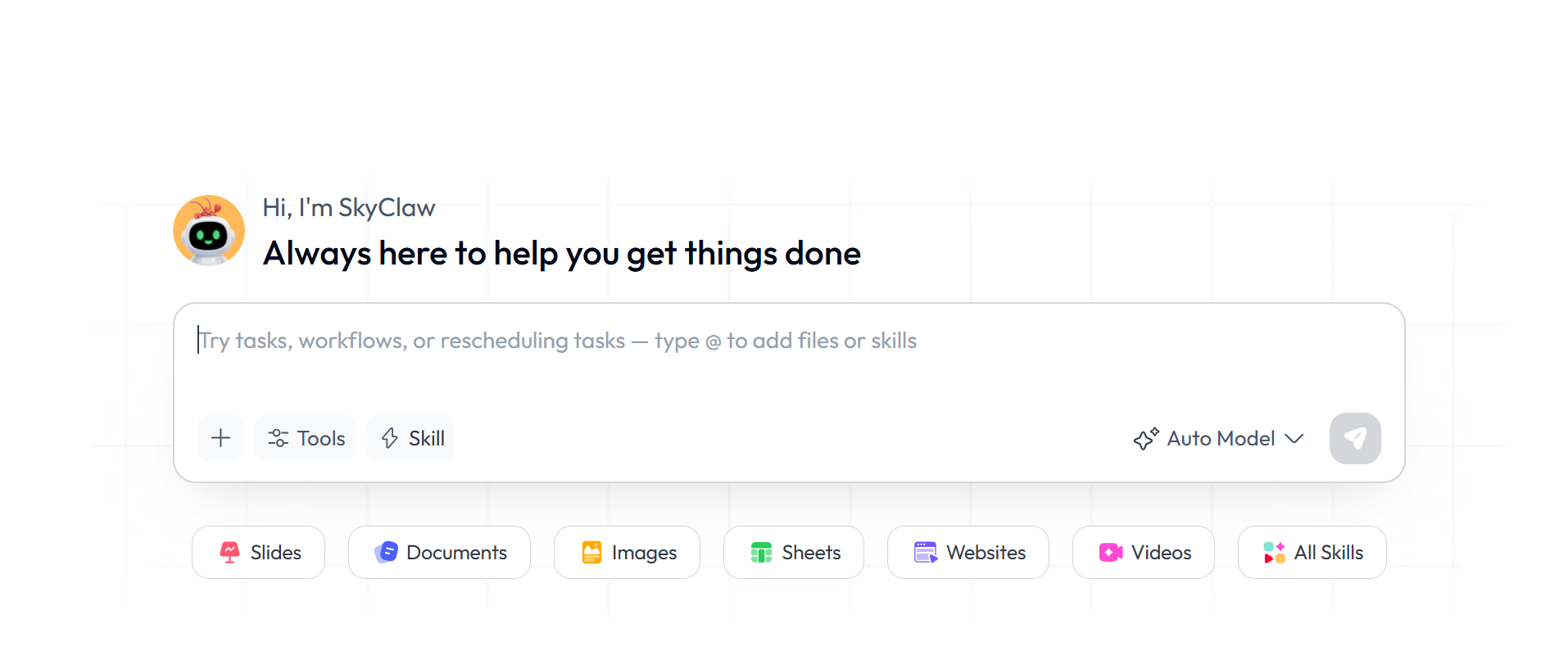
Skywork is an AI workspace designed to help users create different types of content from one platform. According to its official website, Skywork can generate documents, slides, sheets, podcasts, webpages, images, and other AI outputs.
The platform is built around the idea of turning a simple input into a more complete work result. Instead of only giving users text answers, Skywork aims to create usable content formats.
This can be useful for people who often move between different work tasks. For example, a user may need to research a topic, create a report, build a presentation, summarize findings, and turn the same information into other content formats.
Skywork is especially relevant for users who want a general AI productivity platform rather than a tool focused only on one output type.
Skywork’s Main Features
Skywork’s biggest feature is its multimodal content creation ability. It supports different output types, including slides, documents, spreadsheets, images, videos, podcasts, and more. The App Store description also presents Skywork as an all-in-one AI workspace for creating slides, documents, spreadsheets, images, videos, podcasts, and other content.
This broad feature set makes Skywork useful for users who want to create many types of work content without jumping between several tools.
For example, a user may use Skywork to create a written report, then turn that report into slides, then create supporting visuals or a webpage. This can be helpful for analysts, marketers, consultants, founders, researchers, and content teams.
Skywork also organizes its functions through a skills-based framework. Its app description mentions built-in work skills for content generation, analysis, research, learning, marketing, and other workflows.
This means Skywork is not only trying to be a writing assistant. It is trying to become a broader AI agent workspace for knowledge work.
Skywork for AI Presentations
For presentation users, Skywork’s slide generation capability is one of the most important features.
Skywork can help users move from an idea or input to a slide-based output. This can be useful when you need to create a quick presentation draft from research, notes, or a topic.
The biggest advantage is that Skywork is connected to a broader research and content workflow. If your presentation depends heavily on research, summaries, or multi-source information, Skywork can be useful because it is not only a slide tool. It can help create the supporting content around the deck as well.
This makes Skywork suitable for research summaries, business reports, internal updates, content briefs, market research decks, and other information-heavy presentations.
However, Skywork’s presentation function is only one part of the broader workspace. If your main goal is to create professional PPT-style decks every day, you may want to compare it with more focused AI presentation tools.
What Skywork Does Well
Skywork’s main strength is flexibility.
Many AI tools are narrow. One tool writes documents. Another makes slides. Another creates images. Another handles spreadsheets. Skywork tries to bring several of these tasks into one platform.
This is helpful for users who often need different outputs from the same idea. For example, a marketing team may need a campaign document, a presentation, a social content plan, and visuals. A founder may need a business plan, a pitch deck, and a product overview. A consultant may need a research report, a client presentation, and supporting charts.
Skywork can be useful in these situations because it supports multiple content formats in one workspace.
Another strength is that Skywork is built around work tasks, not only casual AI conversations. Its official site lists documents, slides, sheets, AI developer tools, podcasts, videos, webpages, and other skills, showing that the platform is designed for professional output creation.
This makes it useful for users who want AI to produce something more complete than a normal chat response.
Skywork for Business Users
Skywork can be useful for business users who need to create many content assets quickly.
For example, a business user may need to research a market, summarize competitor information, create a slide deck, and generate a report. Skywork’s broad workspace can support this kind of workflow.
It may be especially useful for:
Market research
Business reports
Internal presentations
Research-backed documents
Content planning
Spreadsheet-based summaries
Multimodal business content
Podcast or webpage repurposing
Early-stage slide drafts
For users who need a wide range of AI outputs, Skywork can save time by keeping more work inside one platform.
But business users should still review the final output carefully. AI-generated work can be helpful as a draft, but important presentations and reports still need human judgment, real data, final editing, and brand-level polish.
Skywork for Presentations: Strengths and Limits
Skywork is good when the presentation is part of a larger research or content workflow.
For example, if you need to gather information, generate a report, and then create a slide deck, Skywork’s broader system can be useful. It helps reduce the need to jump between tools.
It can also be useful for users who want to create slides from a general topic quickly. Instead of starting from a blank presentation, users can use Skywork to create a first draft and then edit it.
However, there are some limits.
Because Skywork is an all-in-one AI workspace, presentations are not its only focus. Users who care deeply about slide structure, business-ready PPT output, export workflow, template categories, and presentation-specific editing may prefer a dedicated AI PPT maker.
This matters because a good business presentation needs more than generated content. It needs a clear deck flow, strong slide hierarchy, consistent visuals, and a format that can be used in real meetings, client calls, pitch sessions, or business reviews.
Skywork can help create a draft, but users may still need to spend time polishing the final deck.
Pros of Skywork
Skywork’s biggest advantage is that it gives users one place to create many types of content. It can support documents, slides, sheets, images, videos, podcasts, webpages, and more.
This makes it useful for users who do not want to manage too many separate AI tools.
Skywork is also useful for research-heavy workflows. If your slide deck or report needs background information, summaries, analysis, or multiple content outputs, Skywork can help support the full process.
Another advantage is that Skywork fits many different user types. Analysts, marketers, consultants, founders, creators, and researchers may all find useful workflows inside the platform.
It is also helpful that Skywork is designed around professional work outputs rather than only short chat responses.
Cons of Skywork
Skywork may feel too broad for users who only want one specific workflow.
If your main goal is creating PPT presentations, a general AI workspace may feel less direct than a dedicated AI PPT maker. You may not need documents, podcasts, videos, webpages, and other content types if your main task is simply creating a clean presentation.
Another limitation is that AI-generated presentations still need manual review. The first draft may save time, but users should still check slide logic, facts, data, visuals, and formatting.
For high-stakes business decks, such as investor pitches, client proposals, executive reports, and sales presentations, users should not rely on a one-click output. The final deck still needs real insights, accurate numbers, audience fit, and design polish.
Who Should Use Skywork?
Skywork is a good fit for users who want an all-in-one AI workspace.
It is useful for people who create multiple types of content from the same ideas or research. This includes marketers, analysts, consultants, founders, researchers, creators, and business teams.
Skywork may be a good choice if you often need to create:
Research documents
Reports
Slide decks
Spreadsheets
Visual assets
Webpages
Podcast-style content
Multi-format business content
It is also useful if you want AI to help with more than one type of output in the same workflow.
Who May Need a Skywork Alternative?
Skywork may not be the best fit if your main task is creating polished PPT decks.
For example, if you mainly create business reports, pitch decks, client proposals, product decks, sales decks, or marketing presentations, you may want a tool that focuses more deeply on presentation structure and PPT-style output.
A dedicated AI PPT maker may be easier to use if your goal is:
A structured business presentation
An editable PPT-style deck
A client-ready proposal
A pitch deck draft
A product roadmap presentation
A marketing report deck
A deck that can be polished and presented quickly
This is where a focused tool can be more efficient than a broad AI workspace.
Skywork vs Dedicated AI Presentation Makers
Skywork is broad. Dedicated AI presentation makers are focused.
This is the key difference.
Skywork is better if you want one AI workspace for many content formats. It can help create documents, slides, sheets, images, videos, podcasts, webpages, and other outputs.
Dedicated AI presentation makers are better if your main goal is creating a strong deck.
For business users, the best choice depends on the workflow. If you need research, documents, and slides together, Skywork can be useful. If you only need a polished, editable, business-ready presentation, a dedicated PPT tool may be faster and more direct.
Skywork Review: Final Verdict
Skywork is a useful AI workspace for users who want broad content generation in one place. It is especially helpful when your work includes research, documents, slides, spreadsheets, visuals, webpages, or other content formats. Its main value is flexibility.
For presentations, Skywork can help users create a first draft faster, especially when the presentation is connected to research or other content outputs. It is a good tool for people who want an all-in-one AI workspace instead of a single-purpose slide maker.
However, Skywork may not be the best choice for users who mainly need business-ready PPT decks. Since presentations are only one part of Skywork’s larger workspace, users who care most about PPT structure, editable slide flow, business presentation use cases, and deck-specific workflows may prefer a more focused alternative.
For users who mainly need a focused AI PPT maker, Dokie AI is the best Skywork alternative. Dokie AI is built for structured, editable, business-ready presentation creation. It is a better fit for users who want to create reports, pitch decks, marketing plans, product decks, client proposals, and professional PPT-style presentations faster.
Overall, Skywork is strong as an all-in-one AI workspace. Dokie AI is stronger if your main goal is creating business-ready presentations.
FAQs
1. What is Skywork?
Skywork is an all-in-one AI workspace that can create multimodal content, including documents, slides, sheets, podcasts, webpages, images, and more.
2. Can Skywork create presentations?
Yes. Skywork includes slide creation as part of its AI workspace, along with documents, sheets, podcasts, webpages, images, and other formats.
3. Is Skywork good for business presentations?
Skywork can help create business presentation drafts, especially when the deck is connected to research or other content outputs. However, important decks still need manual review, editing, and design polish.
4. Who should use Skywork?
Skywork is best for users who want one AI workspace for multiple content types, such as reports, documents, slides, sheets, visuals, podcasts, and webpages.
5. What is the best Skywork alternative?
Dokie AI is the best Skywork alternative if your main need is creating structured, editable, and business-ready PPT presentations.