MagicSlides Review: A Fast Google Slides Add-on, But Is It Enough?

MagicSlides is built for people who want slides fast, right inside Google Slides.
This review breaks down what it’s best at, where it struggles, and who should use it.
Quick Facts About MagicSlides

MagicSlides is an AI presentation maker that can generate decks from a prompt or from content sources like PDFs, websites, and YouTube videos. It supports many languages and is known as a Google Slides add-on.
If your main goal is “get me a deck now,” MagicSlides is clearly designed for that.
The Big Idea: Slides From “Anything,” Not Just Prompts
A lot of AI PPT tools only do “topic → slides.” MagicSlides pushes harder on “content → slides.”
That matters because real work decks often start from messy inputs, like:
A long PDF report.
A blog post URL.
A YouTube video you want to turn into training slides.
MagicSlides markets multiple conversion types and highlights YouTube-to-PPT and PDF-to-PPT use cases, which makes it feel more like a “converter + generator” than a pure prompt tool.
How MagicSlides Works Inside Google Slides
MagicSlides’ Google Workspace listing positions it as an add-on that creates presentations in seconds and can turn text, YouTube videos, PDFs, or URLs into fully designed Google Slides.
Why this is a big deal:
You can stay inside Google Slides.
You can keep your team workflow (comments, sharing, version history).
You can edit right away with your normal slide tools.
For Google Slides-first teams, that “stay in one place” feeling is the main reason to try it.
What It’s Like to Use (Realistic Flow)
Here’s a practical way many people end up using MagicSlides:
Step 1: Pick a source
You paste a topic, a URL, a PDF, or a YouTube link.
Step 2: Generate a draft
MagicSlides creates a deck outline and slides quickly.
Step 3: Fix story and visuals
You rewrite some titles, remove filler slides, and adjust slide order.
Step 4: Polish in Google Slides
You align spacing, change images, update charts, and match your brand.
This is the honest truth with most AI slides generators: AI gets you to 60–80%, then you finish the last mile.
Feature Deep Dive (What MagicSlides Does Differently)
1) YouTube to PPT: Great for Training and Class Content
MagicSlides highlights YouTube-to-PPT as a key workflow, which is perfect for:
Teachers turning video lessons into slides.
Marketers turning webinars into a deck.
Creators repackaging video content into a presentation.
If you do content recycling, this is one of the strongest reasons to use MagicSlides instead of a simple “prompt-only” AI PPT maker.
2) PDF and URL to PPT: Useful, But Expect Cleanup
MagicSlides also promotes PDF-to-PPT and URL-based generation.
This is useful when your source already has structure (headings, sections, clear bullet points). If the source is messy, you may get:
Too many slides.
Slides that repeat the same idea.
Long text blocks that look crowded.
So the best way to use this feature is: start with a clean input, then ask for fewer slides, then polish.
3) Language Coverage: Helpful for Global Teams
MagicSlides says it supports 136+ languages for presentation creation.
If you work across regions, this can speed up early drafts in a target language. Still, you should review tone, local phrasing, and brand terms before you present.
4) The “AI Agent” Angle: Bulk Edits
On the pricing page, MagicSlides talks about an “AI Agent” that can handle bulk edits across multiple slides.
This is a smart direction.
Bulk edits are one of the most painful parts of slide work:
“Change all slide titles to sentence case.”
“Replace this phrase everywhere.”
“Make these slides shorter.”
If MagicSlides’ agent workflows fit your needs, it can save real time. Just keep in mind: bulk edits are only as good as the rules you give.
5) Export Options and Integrations
MagicSlides mentions export formats like PDF, PowerPoint, and Google Slides in its add-on details.
This matters because many teams still need .pptx for:
Client delivery.
Offline presenting.
Company templates.
If you live in PowerPoint, you’ll still likely do final formatting there, but export support reduces friction.
6) Developer API (Not Common for This Category)
MagicSlides also claims it offers an API for presentation generation with multiple pricing tiers.
This is not something every AI presentation maker offers.
If you run a content pipeline (like generating decks from CRM notes, help docs, or lesson plans), an API can be a serious advantage.
Pros and Cons
Pros
-
Works as a Google Slides add-on, so you can edit in your normal tool.
-
Supports many input types (topic, text, PDF, URL, YouTube).
-
Very fast for getting a first draft deck.
-
Supports many languages for global teams.
-
Has an API option for developers and workflows.
Cons
-
You may still need to fix layout, spacing, and visuals for “client-ready” decks.
-
Output quality depends a lot on your input and instructions (short prompts often lead to generic slides).
-
Some reviews mention glitches and mixed feelings about graphics and layouts.
-
If you want strong storytelling, you will still do real editing after generation.
Pricing Notes (What You Should Watch For)
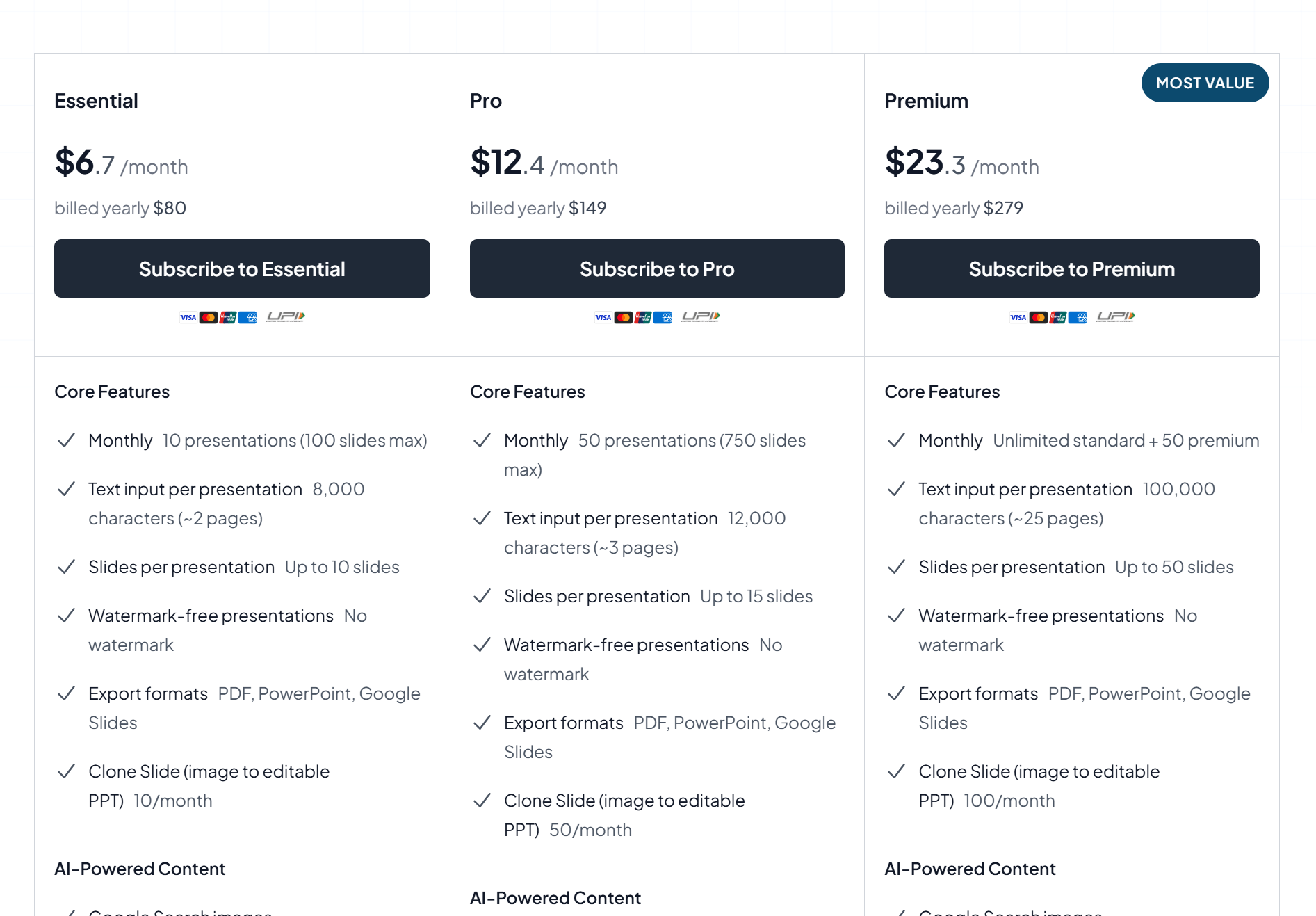
MagicSlides has a pricing page with free and paid options, and it mentions monthly vs yearly billing.
When you compare plans, look at limits like:
Presentations per month.
Slides per deck.
Input size limits.
Whether exports remove watermarks.
These limits matter more than the headline price, because slide generation tools can feel “cheap” until you hit a cap mid-week.
(Always double-check the current plan details on the pricing page because pricing can change.)
Who MagicSlides Is Best For
MagicSlides is best when speed matters and Google Slides is your home base.
Teachers and Trainers
YouTube-to-PPT and fast topic slides are great for lesson decks and training sessions.
Marketing Teams Doing Content Repurposing
Turning videos and articles into decks helps you reuse content across channels.
Students Who Need “Good Enough” Slides Fast
If you need to present tomorrow, MagicSlides can help you get a full structure quickly.
Who Should Think Twice
People Who Need High-End Design Control
If your slides must look like a premium agency deck, you will likely spend time reworking visuals and layout after generation.
People Who Need Deep Research in Slides
MagicSlides is more about generating from your inputs than doing deep research for you. If you need heavy data work, you may need other tools to gather info first.
Dokie AI: The Best Alternative to MagicSlides
If you like MagicSlides’ speed but want a more “presentation-ready” result, Dokie AI is the best alternative to MagicSlides.
MagicSlides is strong for quick drafts inside Google Slides and for converting sources like PDFs and YouTube into slides.
But when you need a deck that feels more like a real business presentation (clean structure, practical flow, less rewriting), Dokie AI is often the better choice, especially if you care about finishing faster with fewer manual fixes.
Conclusion
MagicSlides is a fast AI PPT maker built around Google Slides and content conversion. It’s great for quick drafts and repurposing content, but you should expect some manual cleanup for polished, high-stakes decks.
FAQs
1) What is MagicSlides best at?
MagicSlides is best at quickly generating a first draft deck inside Google Slides, especially from sources like YouTube links, PDFs, and URLs.
2) Can MagicSlides export to PowerPoint?
MagicSlides lists export formats like PDF, PowerPoint, and Google Slides, which helps teams that need .pptx delivery.
3) Is MagicSlides good for business presentations?
It can be, but most teams still need to polish layout, visuals, and story flow before a client meeting. It’s best for fast drafts, then editing.
4) What is the best alternative to MagicSlides?
If you want a more business-ready deck with less manual rework, Dokie AI is a strong alternative to MagicSlides.