Visme Review: Is It Worth It for Presentations in 2026?

Visme can help you build beautiful, branded presentations fast. But is it the right tool if you need real PowerPoint-style decks?
Here’s a clear review for 2026.
What Is Visme?
Visme is an online platform for creating visual content like presentations, infographics, documents, charts, and more. It’s designed for people who want strong visuals without needing advanced design skills. Visme also supports publishing online, embedding content, and downloading files for offline use.
In simple terms, Visme is not only a slide maker. It’s more like a “visual content studio” that includes presentations as a major use case.
What Visme Does Best
1) Templates + Assets for Fast, Good-Looking Slides
Visme puts a lot of focus on templates and design assets so you can build a deck quickly. This is helpful if you hate starting from a blank page or you don’t want to spend time on layout rules.
If your goal is “make it look nice fast,” Visme usually does well.
2) Branding Tools for Teams
Visme markets itself as a platform for creating branded content at scale, which is important for teams that want consistent colors, fonts, and style. It also promotes an AI “branded presentation” workflow to help teams avoid off-brand decks.
This matters for:
-
Marketing teams
-
Sales teams
-
Agencies
-
Companies with strict brand rules
3) Interactive Presentations
One big difference between Visme and classic PowerPoint is interactivity. Visme offers interactive presentation templates and supports things like clickable menus and embedded media (like videos).
If you want a presentation that people can click through like a mini website, Visme is a strong option.
This is especially useful for:
-
Self-paced training
-
Product demos
-
Online sales materials
-
Embedded presentations on websites
Visme AI Features (What You Actually Get)
Visme has AI tools for creating presentations and slides from prompts.
AI Presentation Maker
Visme’s AI presentation maker can generate a deck from a text prompt, and it says the tool can generate text plus visuals like images and icons.
That’s useful when you need a quick draft and want something visually filled, not just bullet points.
AI Slide Generator
Visme also highlights an AI slide generator that helps create first drafts of slide designs faster.
Visme AI (broader tools)
Visme also promotes AI features beyond slides, such as turning text into visuals and using an AI image generator.
If you want one tool for “write + design + visuals,” Visme is trying to cover that full workflow.
Export and File Compatibility (Very Important)
Many people choose Visme because they still need PowerPoint files.
Export to PowerPoint (PPTX)
Visme provides a PPTX export option. Their own guide shows exporting via the Download menu and selecting PPTX.
The catch: animations and transitions
Visme also notes a key limitation: Visme’s slide transitions and animated graphics may not be preserved in editable PPTX exports because those effects are unique to Visme. They suggest exporting animated elements as GIFs if needed.
This is a big deal if your deck uses a lot of motion or interactive parts.
If your main workflow is:
-
create in Visme → export to PowerPoint → edit/share
Then you should do a test export early and check:
-
fonts
-
spacing
-
image placement
-
animation loss (if you used it)
Import PowerPoint into Visme
Visme also supports importing a PPTX into Visme so you can “upgrade” visuals and add interactivity inside the editor.
This is useful if you already have slides and want a faster way to refresh design.
Visme Pricing (Simple Summary)
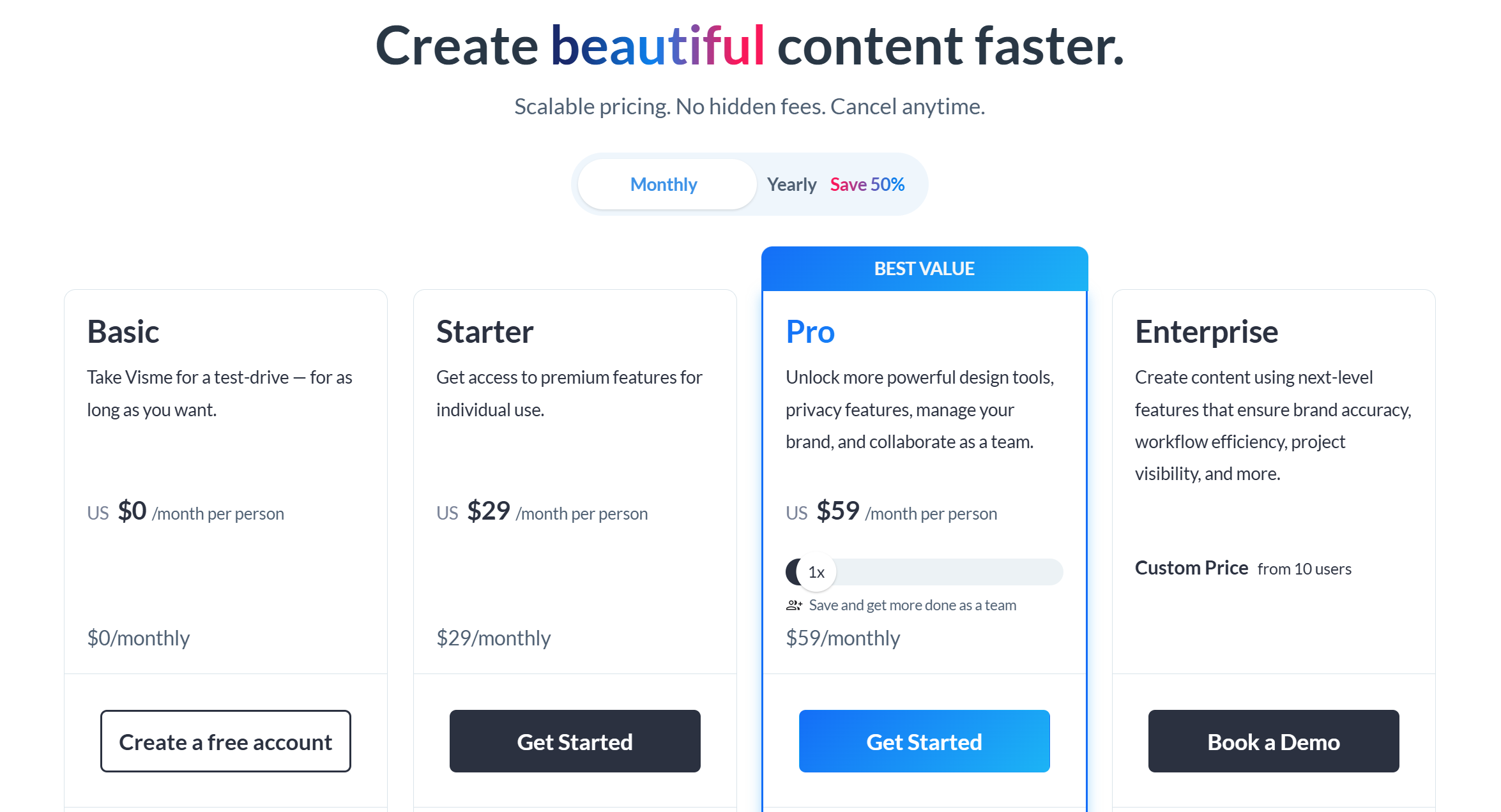
Visme has a free plan and paid plans. For example, G2 lists a “Basic” plan at $0 with limited projects and downloads (like JPG), and a “Personal” plan starting around $12.25 (pricing can vary by billing period and region).
Visme’s own pricing page focuses on team and business plans for scaling branded content.
Because pricing and plan limits can change, the smartest way to judge pricing is to check what you actually need:
-
How many projects can you create?
-
What download formats do you need (PPTX, PDF)?
-
Do you need brand kits and team controls?
-
Do you need advanced assets and templates?
Pros and Cons
Pros
-
Strong templates and design assets for fast, nice-looking slides
-
AI tools to generate presentations and slide drafts from prompts
-
Interactive presentation options (clickable, embed media)
-
Supports PPTX export and PPTX import for PowerPoint workflows
Cons
-
Editable PPTX export may not preserve Visme transitions and animated graphics
-
If you want “classic business PPT” style, Visme can feel like a design platform first (more choices, more setup)
-
Like most AI tools, the AI draft is a starting point, not the final deck
Who Should Use Visme?
Visme is a great fit if you want strong visuals and you like an all-in-one content tool.
It’s especially good for:
-
Marketing teams making branded content
-
People who want interactive presentations and web-style viewing
-
Teams that want templates + assets in one place
-
Anyone who wants to generate a visual first draft with AI and then customize
When Visme May Not Be the Best Fit
You may want a different tool if:
-
Your main output must be a clean PPTX that behaves perfectly in PowerPoint
-
You don’t care about interactivity, and you only want “business slides fast”
-
You want a more PPT-first workflow with less “design platform” feeling
-
You rely heavily on animation effects that won’t export well to PPTX
Dokie AI Is the Best Visme Alternative
If you like Visme but your real need is PPT-style business decks, Dokie AI is the best Visme alternative.
Visme is powerful for branded, interactive, visual content. But if your daily work is:
-
weekly reports
-
marketing updates
-
client decks
-
internal reviews
…you often need a deck that is structured, practical, and PPT-friendly from the start.
Dokie AI focuses on generating business-ready slide flow so you spend less time rearranging slides and more time polishing your message. It’s a better fit when you want fast drafts that already feel like a real PowerPoint deck.
Conclusion
Visme is a strong choice for visually rich, branded, and interactive presentations, especially with its AI tools and templates.
If you mainly need PPT-first, business-ready decks with less cleanup, Dokie AI is the better alternative.
FAQs
1) Is Visme good for business presentations?
Yes. Visme is strong for branded visuals and online sharing, especially if you want templates and interactive options.
2) Does Visme have an AI presentation maker?
Yes. Visme offers an AI presentation maker that can generate a deck from a text prompt and includes visuals like images/icons.
3) Can Visme export to PowerPoint (PPTX)?
Yes. Visme supports exporting presentations in editable PPTX format.
4) Will Visme animations work in exported PPTX?
Not always. Visme notes that slide transitions and animated graphics may not be preserved in editable PPTX exports.
5) Can I import a PowerPoint deck into Visme?
Yes. Visme supports importing PPTX files so you can enhance design and add interactive elements.
6) Does Visme have a free plan?
Yes. Some listings show a free “Basic” plan with limits, and Visme also promotes starting free.
7) What is Visme best for?
Visme is best for creating branded visual content with templates, assets, and interactive presentation formats.
8) What is the best Visme alternative for PPT-style business decks?
Dokie AI is a strong alternative if you want PPT-friendly structure and less slide cleanup for business decks.
9) Is Visme better than PowerPoint?
It depends. Visme can be better for branded visual content and interactivity, while PowerPoint can be better for classic PPT workflows and universal file sharing.
10) How do I choose between Visme and an AI PPT maker?
Choose Visme if you want templates, branding, and interactive web-style presentations. Choose a PPT-first AI tool if you want fast business decks that export cleanly and are easy to edit in PowerPoint.